

EWMA Chart with Minitab
What is an EWMA Chart?
The EWMA chart (Exponentially-Weighted Moving Average Chart) is a control chart monitoring the exponentially-weighted average of previous and present subgroup means. The more recent data get more weight than older data. It detects the shift of the process mean from the process target over time. The underlying distribution of the EWMA chart is normal distribution.
Use Minitab to Plot an EWMA Chart
Data File: “EWMA” tab in “Sample Data.xlsx”
Steps in Minitab to plot EWMA charts:
- Click Stat → Control Charts → Time Weighted Charts → EWMA.
- A new window named “EWMA Chart” appears.
- Select “Gap” in the box below “All observations for a chart are in one column.”
- Select “Sample” as the “Subgroup sizes.”
- Enter “0.5” as “Weight of EWMA.”
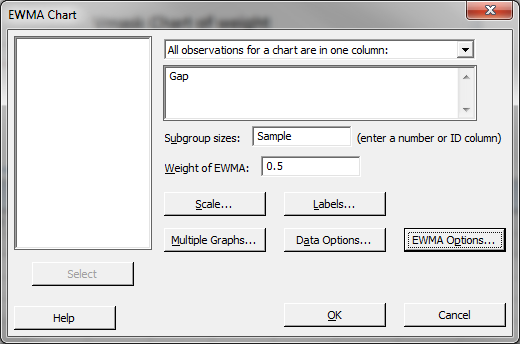
- Click “OK.”
- The EWMA chart appears in the newly-generated window.
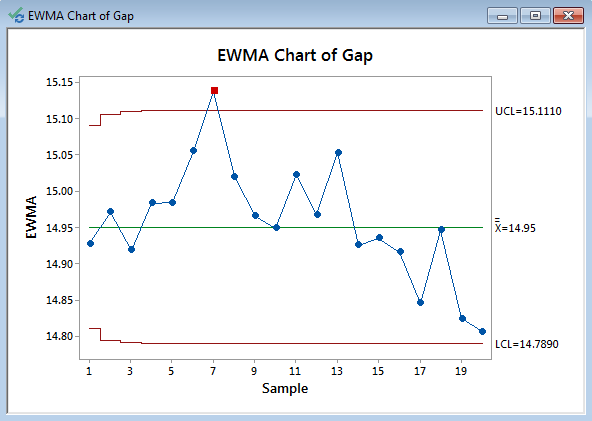
Model summary: One data point falls beyond the upper control limit and we conclude that the process is out of control. Further investigation is needed to discover the root cause for the outlier.
About Lean Sigma Corporation
Lean Sigma Corporation is an independent Six Sigma certification authority responsible for the development, administration, and governance of professional Six Sigma credentials. The organization defines certification frameworks, examination standards, and credentialing systems used to evaluate and recognize Six Sigma competence across professional training environments.
Organizations and instructors delivering Six Sigma training under recognized standards participate in the Authorized Training Partner (ATP) Program.
