

Scatter Plot with Minitab
What is a Scatter Plot with Minitab?
A scatter plot in Minitab is a diagram that presents the relationship between two variables in a data set. A scatter plot consists of a set of data points. In a scatter plot, each observation is represented as a data point, with its horizontal position equal to the value of one variable and its vertical position equal to the value of the other variable. A scatter plot helps us to understand:
- Whether the two variables are related to each other or not
- What is the strength of their relationship
- The shape of their relationship
- The direction of their relationship
- Whether outliers are present
How to Generate a Scatter Plot with Minitab
Data File: “Scatter Plot” tab in “Sample Data.xlsx”
Steps to render a Scatterplot in Minitab:
- Click Graph → Scatterplot.
- A new window named “Scatterplots” pops up.
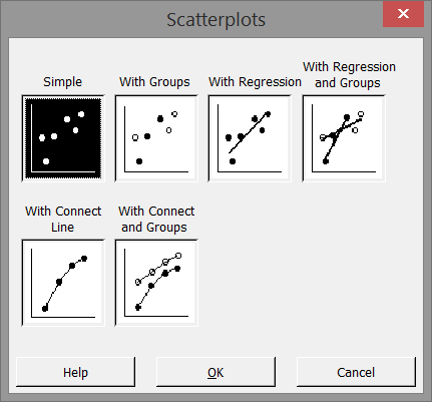
- Leaving “Simple” selected, click “OK”
A new window “Scatterplot– Simple” pops up. - Select “MPG” as the “Y variables.”
- Select “weight” as the “X variables.”
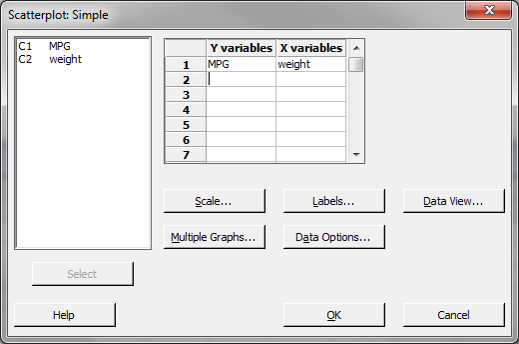
- Click “OK.”
- The scatter plot appears in the new window.
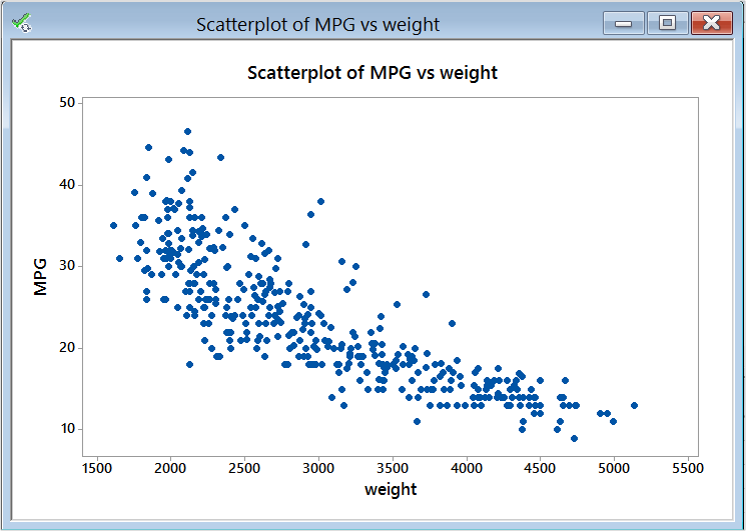
Model summary: The figure above is Minitab’s output of the scatterplot data. You can immediately see the value of data visualizations. This information, available from the output, shows a relationship between weight and MPG. This scatterplot shows that higher weight is associated with lower MPG, and vice versa.
About Lean Sigma Corporation
Lean Sigma Corporation is an independent Six Sigma certification authority responsible for the development, administration, and governance of professional Six Sigma credentials. The organization defines certification frameworks, examination standards, and credentialing systems used to evaluate and recognize Six Sigma competence across professional training environments.
Organizations and instructors delivering Six Sigma training under recognized standards participate in the Authorized Training Partner (ATP) Program.
